Invisoft Notes

Every meeting recorded, transcribed and turned into notes you can act on.

Invisoft Notes records meetings, calls and voice memos on your phone or computer, recognises who said what, and writes the summary, decisions and tasks. Every sentence links back to the second of audio it came from. Runs on your own private instance, in Czech and English, and we adapt it to your business and your brand.
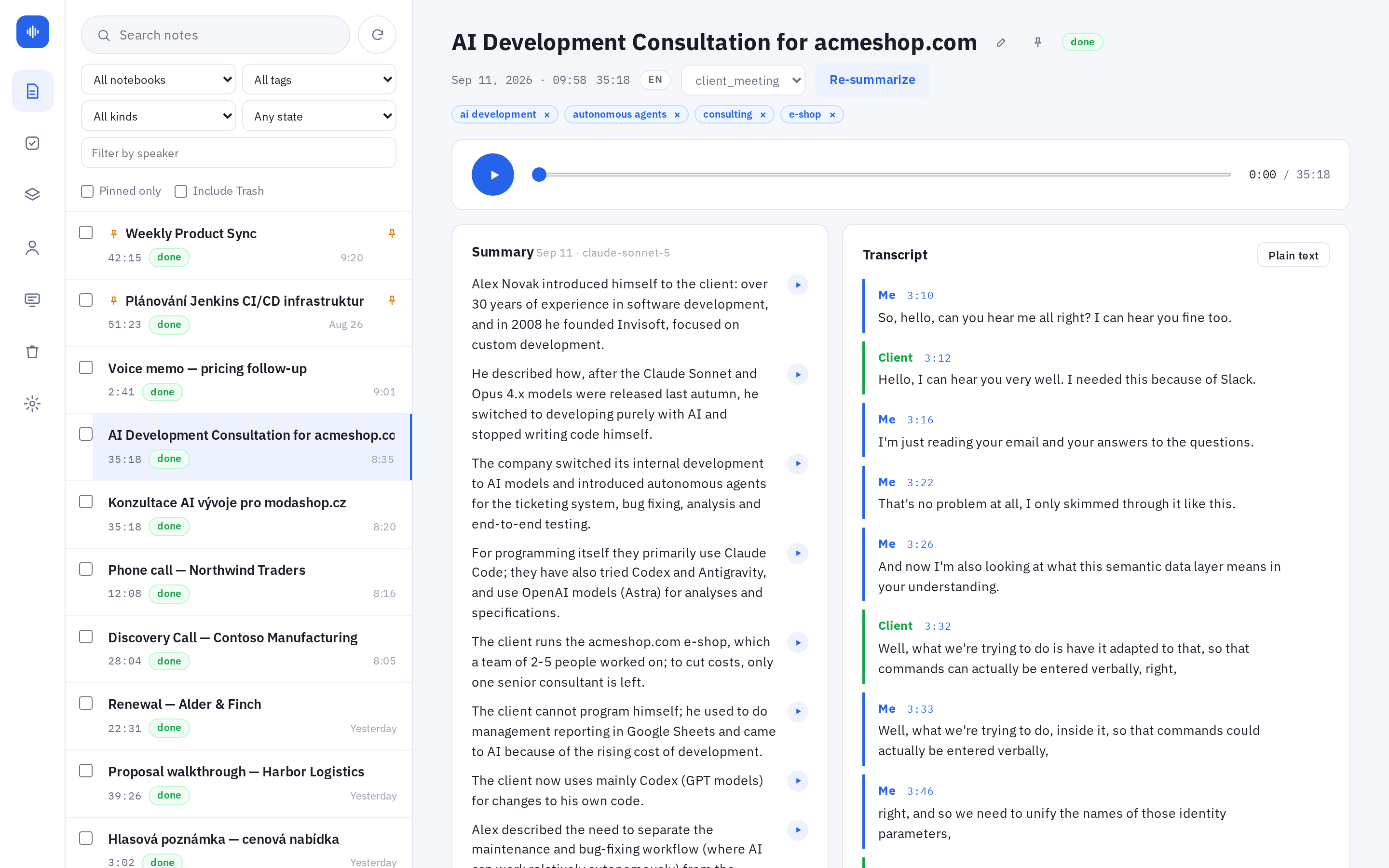
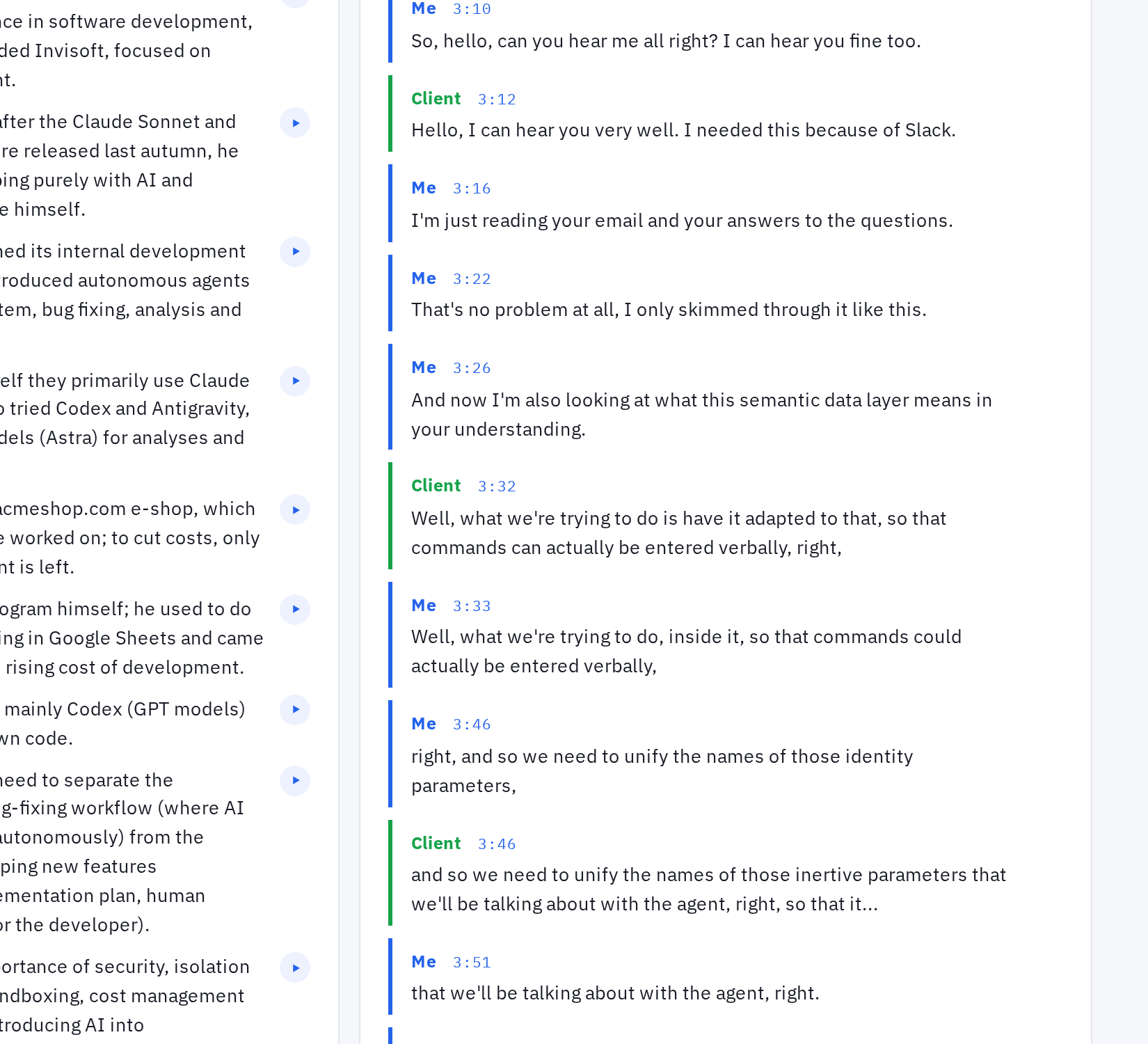
Invisoft Notes web app: a client meeting recording with the summary, decisions and speaker-labelled transcript
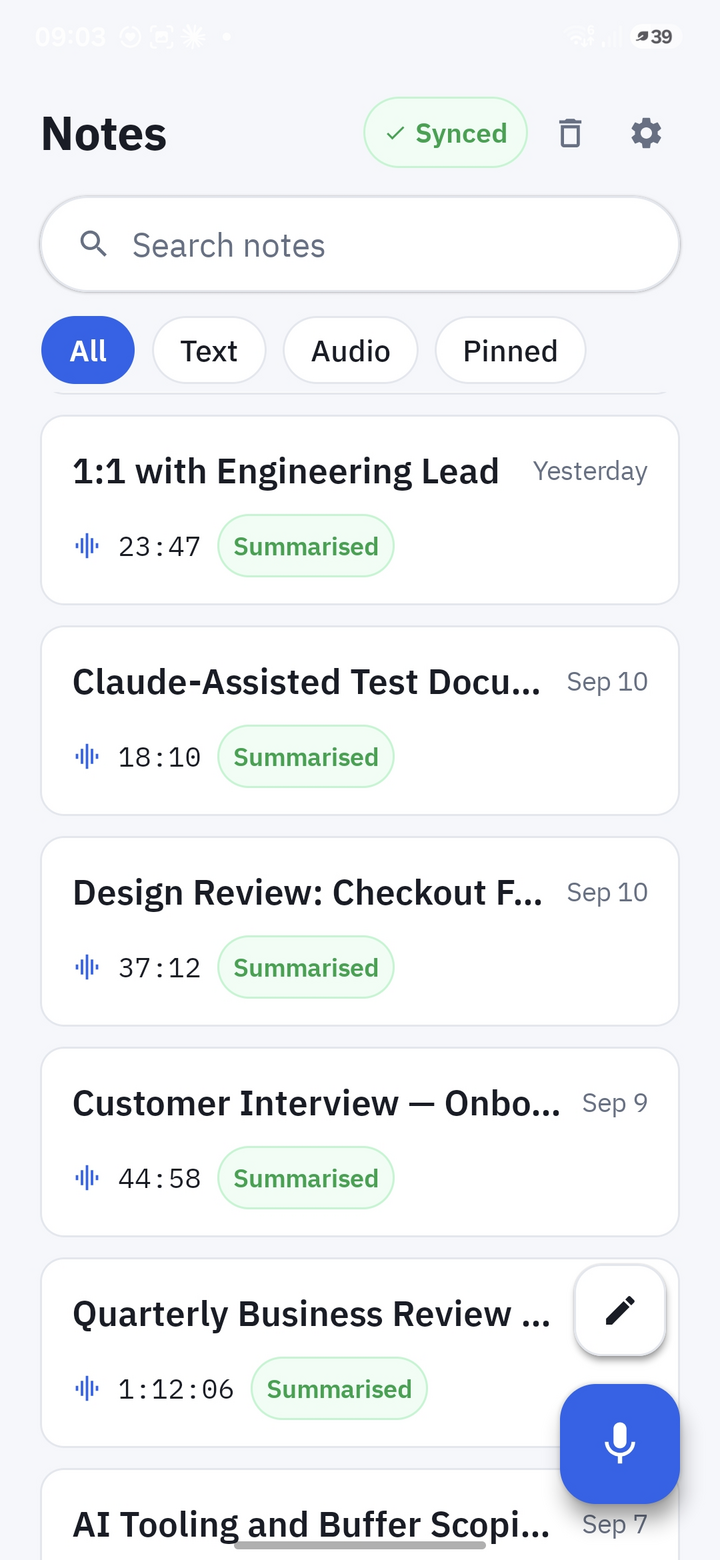
Invisoft Notes Android app: the list of recorded notes with their state

Built around three rules that most note-taking tools break.

Nothing gets lost

The phone records for hours with the screen locked and saves the audio every few seconds. A recording leaves the device only after the server has confirmed it holds an intact copy. A dropped connection or a dead battery costs you seconds, not the meeting.

Every sentence links to the audio

Each line of the summary, each decision and each task carries a play button that jumps to the exact moment in the recording. When a summary sounds wrong, you check the source in two seconds instead of trusting it.

Your recordings stay with you

Every customer gets a private instance. Transcription and voice recognition run on that instance's own hardware, so the audio never goes to a third party. You decide where the instance lives and who can pair a device with it.

Capture

Record wherever the conversation happens.

In person, on your Android phone

One tap from the home-screen widget or the quick settings tile starts a recording. It keeps running in the background with the phone in your pocket, survives a lost signal, and syncs when you are back online.

Online meetings

A small app on your computer records calls from Google Meet, Microsoft Teams, Zoom, Webex and similar tools in two separate tracks: your microphone on one, the other participants on the other. The transcript then attributes every word to the right side. Recording starts and stops together with the call.

Phone calls and recordings from elsewhere

Share an audio file from your dialer, a dictaphone app or any other recorder straight into Notes, or drop it into a watched folder. It is processed exactly like a recording made in Notes.

Text notes next to the recordings

Quick written notes live in the same list, with the same tags, notebooks and search, on the phone and on the web.

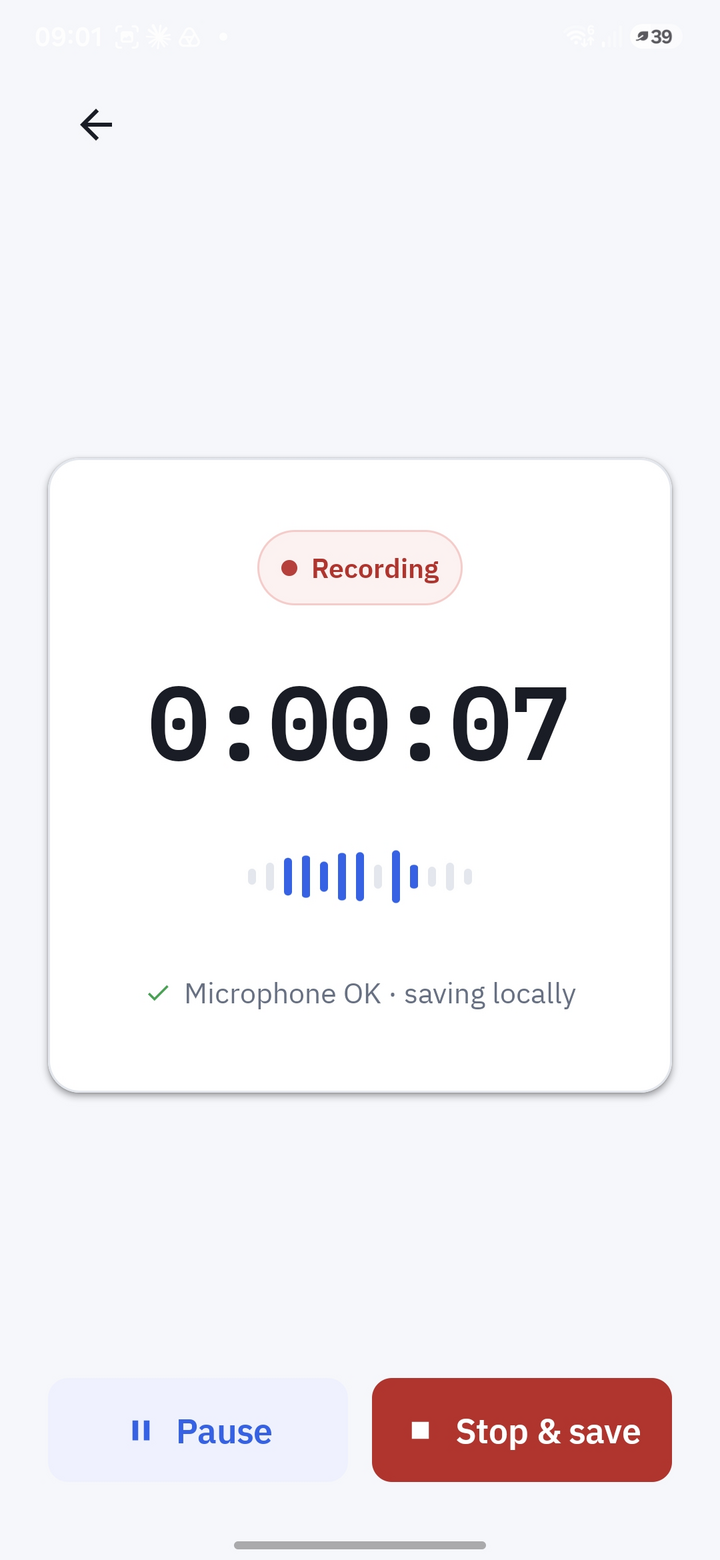
Android app while recording: elapsed time, level meter, pause and stop buttons
Android app: list of notes with search and filters

Summaries

A different summary for a different kind of conversation.

Notes recognises what kind of recording it is looking at and uses a summary template built for it. You can change the type at any time and the summary is rewritten.

Client meeting

  • Purpose of the meeting and who the client is
  • Pricing, scope and deadlines that were mentioned
  • Objections and how the meeting ended
  • Decisions and tasks with an owner

Phone call

  • Who called whom and why
  • Exact figures, dates and names as they were said
  • What was promised and by when

Standup

  • One line per person: done, in progress
  • Team decisions
  • Blockers turned into tasks

Voice memo

  • Your thoughts, cleaned up and split into points
  • Tasks you gave yourself
  • Dictated in the car, readable at your desk

Understand

From an hour of audio to a page you read in a minute.

  • Who said what. The transcript is split by speaker with timestamps. Name a voice once and Notes recognises it in every later recording.
  • Summary, decisions, tasks. Structured, in the language of the recording, each item with a play button to the source.
  • Czech and English, even mixed. Language is detected automatically, also when both appear in one conversation.
  • Title and topics filled in for you. Every recording gets a short title and a few topic tags. Fix the transcript or reassign a speaker in place and re-summarise whenever you like.
  • Player synced to the text. Click any line to hear it. Copy the whole transcript as plain text when you need it elsewhere.
Summary with play buttons on every item, decisions, and a speaker-labelled transcript with timestamps Click to see the whole page

Find and follow up

Three months later you still find the sentence.

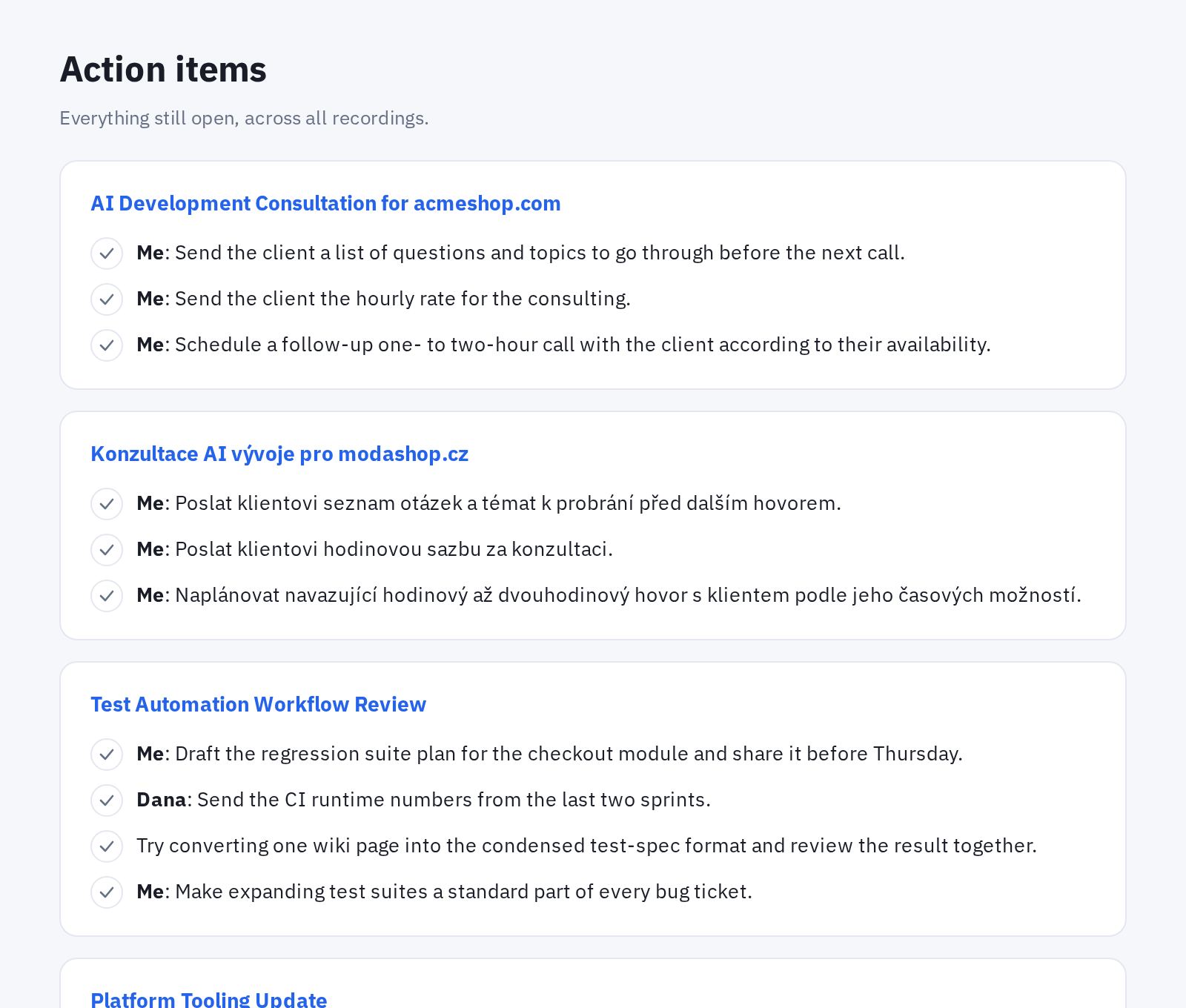
Action items page: open tasks grouped by recording with checkboxes

Tasks across all recordings

Every action item the summaries produced, in one list, grouped by meeting. Tick it off on the web or on the phone and it stays done even after a re-summary.

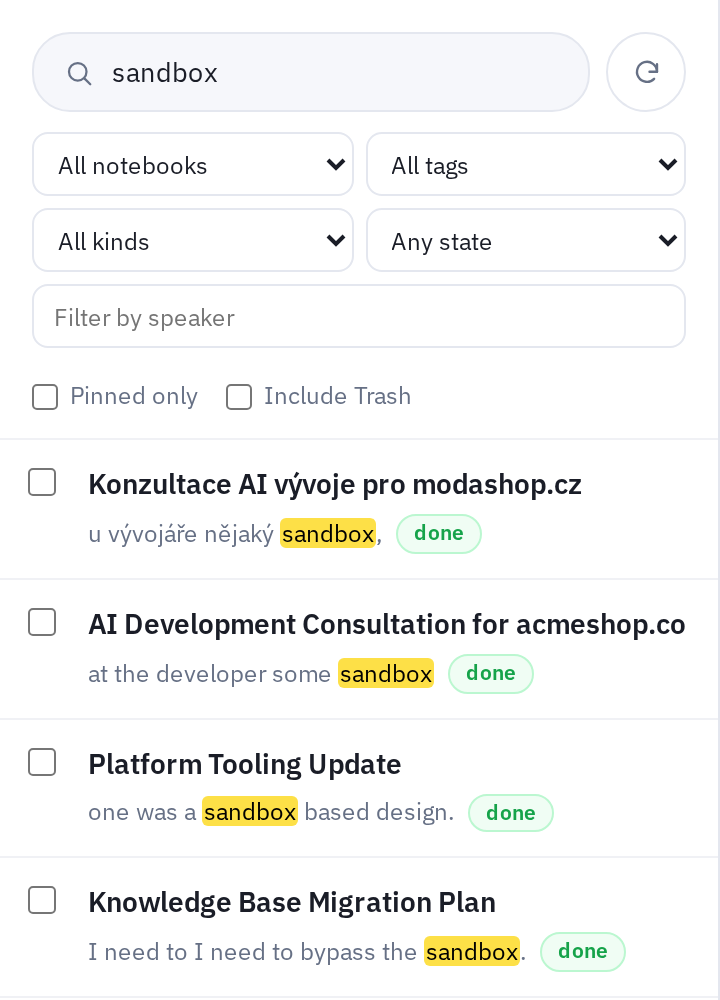
Full-text search with highlighted matches inside transcripts and filters by notebook, tag, kind and speaker

Search that reads transcripts

Full-text search over titles, notes, transcripts and summaries, with the matching sentence shown. Type without diacritics and still find the Czech word. Filter by notebook, tag, kind, speaker or pinned.

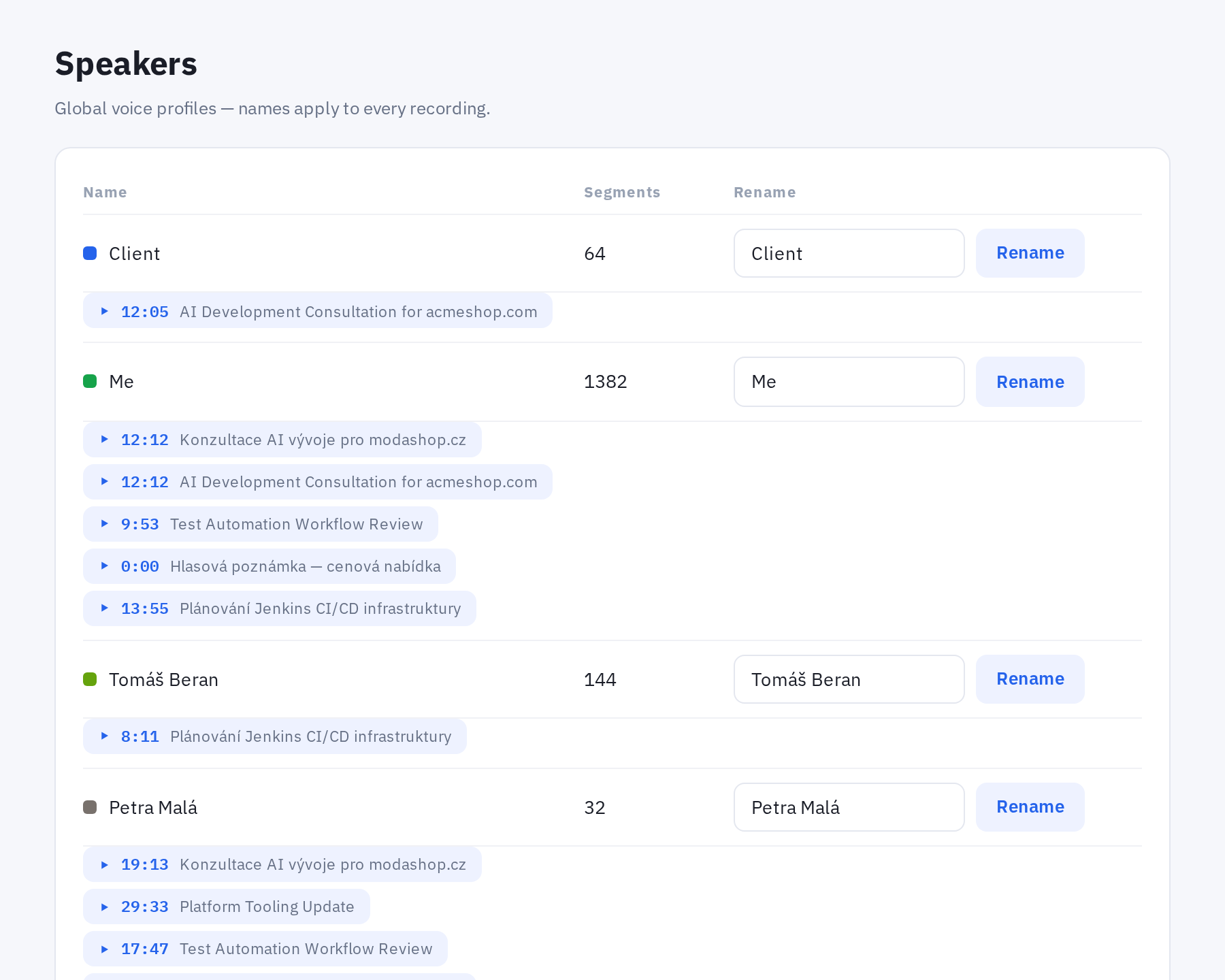
Speakers page: global voice profiles with playable sample clips from different recordings

Voices you name once

Speaker profiles are shared across recordings. Play a few sample clips to work out who a new voice is, rename it, and every past and future transcript picks up the name.

Plus notebooks, pinned notes, a trash with restore, and live sync between the web and the phone within a couple of seconds.

Coaching

Two features that turn notes into a coach.

One shows how you did once the call is over, the other keeps your own preparation in front of you while it is still going on.

Speaker performance

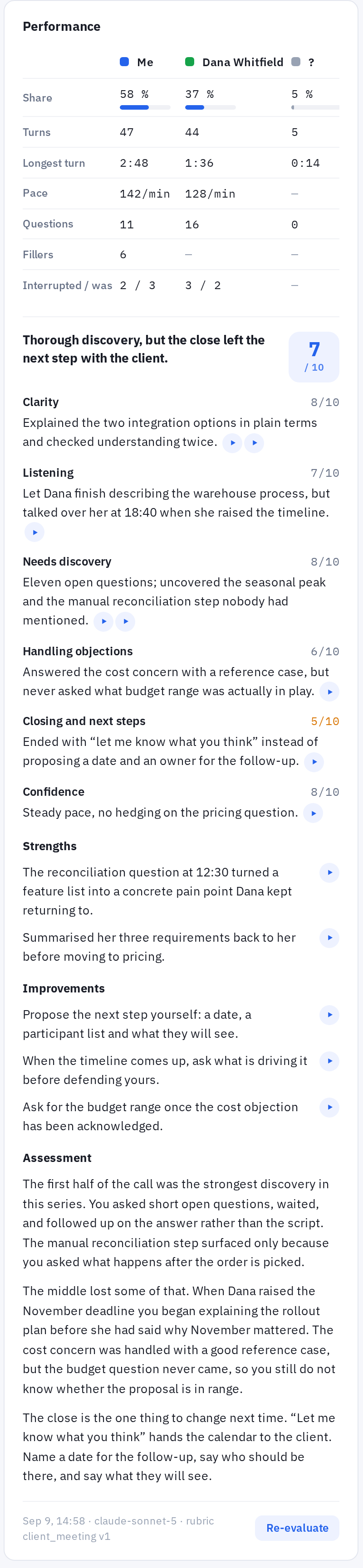
How did you actually do in that call? Notes measures every speaker objectively and, when you ask for it, evaluates your part of the conversation against a fixed rubric for that kind of meeting.

  • Objective metrics for everyone in the room. Share of talking time, number of turns, longest turn, pace, questions asked, filler words, and on two-track recordings of online meetings who interrupted whom.
  • Evaluation on demand. Press Evaluate and get a score from 1 to 10 per criterion. For a client meeting: clarity, listening, needs discovery, handling objections, closing and next steps, confidence. Every score cites the moments it is based on.
  • Written like a coach would say it. Strengths, concrete improvements and a short assessment that names the moment in the call where it went well or wrong.
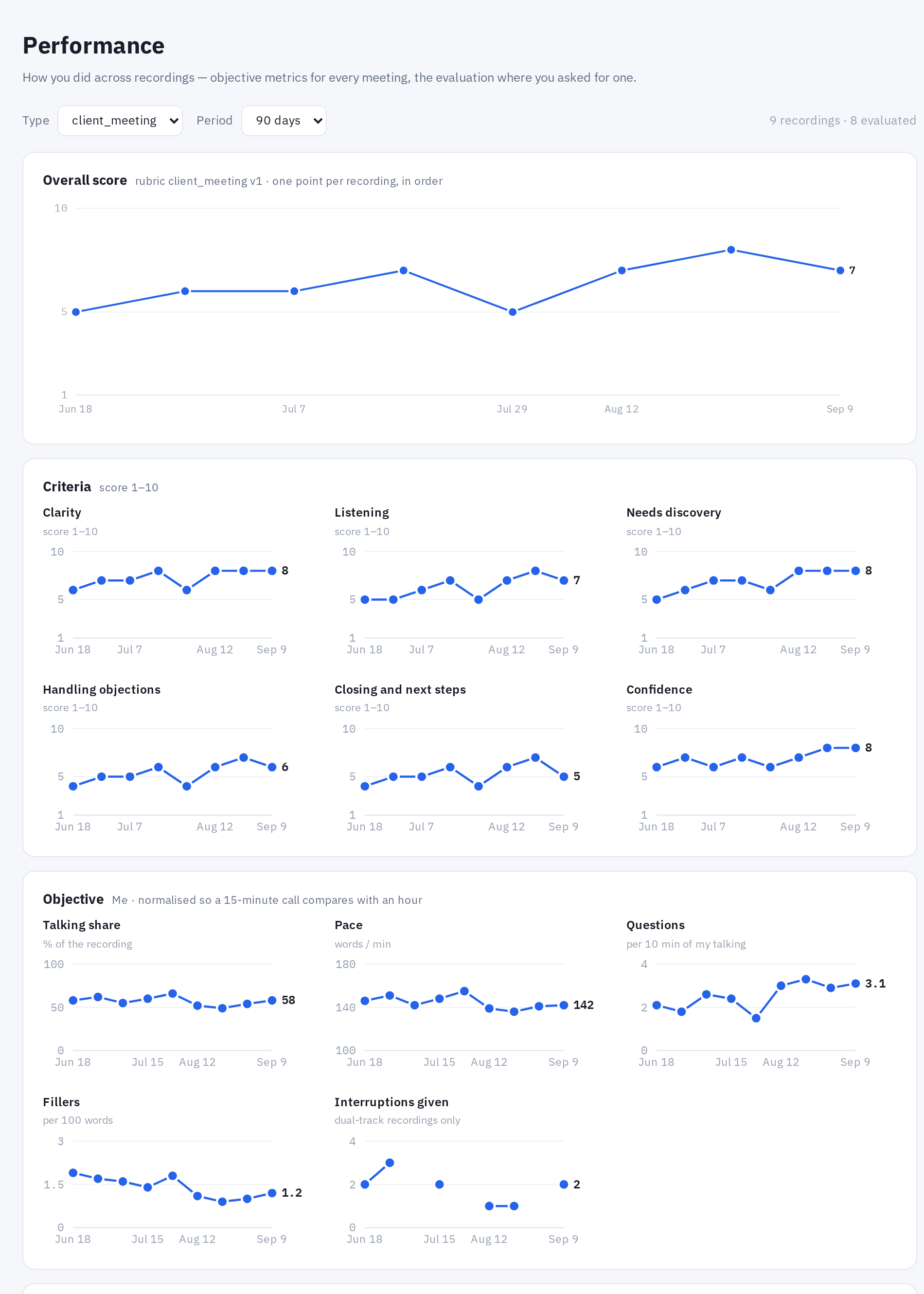
  • Trends over months. A Performance tab charts your overall score, each criterion and the objective metrics over time, per type of meeting. It answers "am I improving", not only "how did this one go".
Performance card on a recording: speaker comparison table, score per criterion, strengths, improvements and the written assessment Click to read the full evaluation
Performance tab: overall score trend, per-criterion charts and objective metrics over 90 days Click to see all the charts

Performance tab: score and objective metrics per meeting over time.

Now Client call · 14:07

Pricing

  • Ask for their budget range before quoting
  • Reference case: Harbor Logistics, same integration, 6 weeks
  • Fixed price for the pilot, daily rate after
Intro Current process Pricing Timeline Next steps

The prompter window during a client call.

Live prompter

Prepare your notes for a call as a plain document, one heading per topic. During the call, Notes listens to both sides, works out which topic you are on, and shows you the notes for exactly that topic on a second screen. No generated advice, just your own preparation shown at the right moment.

  • Works with Google Meet, Microsoft Teams, Zoom, Webex and other meeting tools.
  • A "now" card with a checklist you tick off during the call. An overview of all topics showing which one the conversation is closest to. And a manual switch when you want to pick the topic yourself.
  • The same view mirrored to your phone and to a small floating window over the call for computers with a single screen.

Made to fit

Your workflow, your name on it.

Notes is developed by INVISOFT, a Czech software company. We do not just hand over a licence. We adapt the product to the way your business works and can deliver it under your own brand.

Custom development

  • Summary templates and evaluation rubrics written for your meetings, your terminology and your sales process.
  • Integrations with the systems you already use: CRM, ticketing, calendar, document storage.
  • New recording sources, additional languages, multi-user setups for a team.
  • Deployment on your infrastructure or on an instance we operate for you.

Your own branding

  • The web app and the Android app carry your name, logo and colours.
  • Runs on your own domain, with your users seeing only your brand.
  • Suitable for consultancies and agencies that want to offer meeting notes to their own clients.
  • Updates to the core product reach your branded version too.

1

Demo call: we show the product on real recordings and talk about how your meetings run.

2

Pilot on a private instance with your own phone and computer.

3

Tailoring: templates, integrations and branding agreed at a fixed price.

4

Rollout, operation and updates.

Where your recordings go

  • Each customer has a separate instance. There is no shared cloud with other customers' data.
  • Transcription and voice recognition run on the instance itself, on its own graphics card. The audio never leaves it.
  • Summaries and evaluations are prepared from the transcript by a language model of your choice, such as Claude, GPT, Gemini or Mistral. We can also connect your own model through an API. The transcript text is sent to the chosen provider. If the text must not leave your instance either, we can deploy a fully local model as custom work.
  • Deleted notes wait in the trash for 90 days. "Delete forever" removes the audio, transcript and summary at once.
  • Phones and computers are paired with a QR code and each device can be revoked separately.

What you get

  • Web app for reading, searching, editing and managing tasks, speakers and the prompter.
  • Android app that records in the background, works offline and syncs on its own.
  • Desktop app for online meetings (Google Meet, Microsoft Teams, Zoom, Webex and others) with two-track recording and the live prompter.
  • Processing overview: for every recording you see which stage it is in (transcription, speaker recognition, classification, summary), and any step can be run again.
  • Czech and English transcription, summaries and interface.

Pricing depends on the deployment and the amount of tailoring. We send a written proposal after the demo.

See Invisoft Notes on a real recording.

Tell us in a few words what kind of conversations you want to record. We will arrange a 30-minute demo. Nothing to prepare on your side.

Or email us directly at: info@invisoft.eu